
Ch19 发布、验证与边界守卫
Alembic 的发布验证不是一个统一的 npm publish 按钮。五个产品仓库有不同发布形态:Core 是 registry package,Agent 是 registry package,主 Alembic 是 CLI/runtime package,Plugin 由私有开发根仓、双宿主轻壳与公开 runtime package 组成,Dashboard 是前端构建产物并由主 runtime 服务。每个仓库都必须用自己的边界守卫验证。
本章把这些验证路径收束成维护规则。读者不需要记住所有脚本细节,但必须知道每个脚本在保护什么。
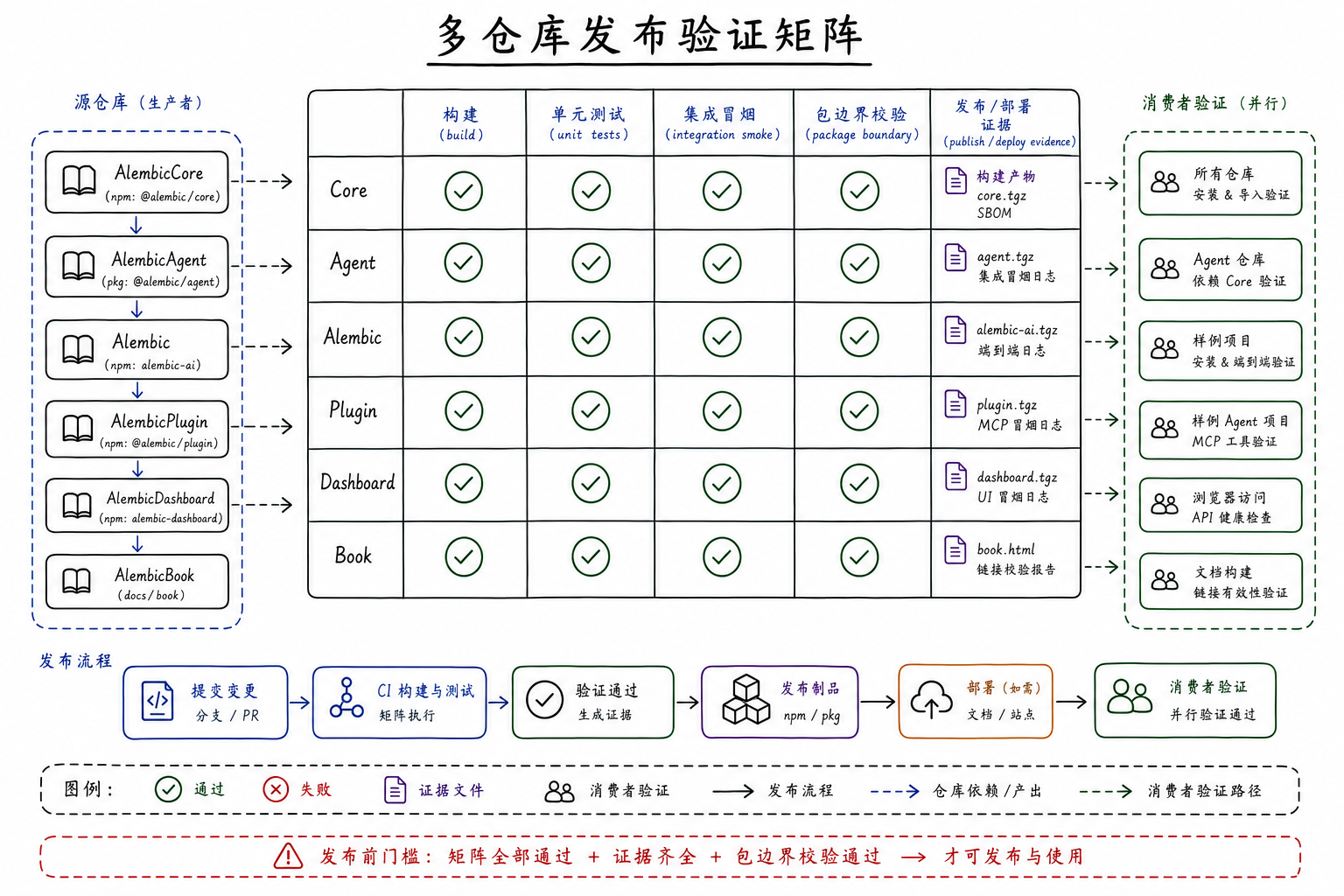
源码锚点:AlembicCore/package.json、Alembic/package.json、AlembicPlugin/package.json、AlembicAgent/package.json、AlembicDashboard/package.json。
本章回答
- 各仓库的发布形态有什么差别。
- Core public API guard、consumer import guard、release package guard 分别保护什么。
- Plugin 为什么 root registry publish disabled。
- 什么时候需要验证 runtime artifact、plugin cache、Dashboard build。
Core 先稳住 public API
AlembicCore 的 release guard 包括:
npm run check
npm run build
npm run smoke:public-api
npm run check:output-budgets
npm run release:check
这些命令保护的是 @alembic/core 的包入口、类型输出、测试、lint、public API boundary 和 release readiness。Core 是其他仓库的底座,发布前必须确认 dist exports、package contents、source commit evidence 和 sibling-free dependency。
Core 的失败通常不是“某个 UI 坏了”,而是共享 contract 不稳定。外层仓库一旦依赖了未公开的 deep import,就可能在 Core 发布时断裂。
主 Alembic 验证 resident runtime
主 Alembic 的 scripts 包含 build、build:core、build:dashboard、check、lint:agent-extraction-boundary、lint:core-import-boundary、lint:repo-boundary、smoke:multi-project-control、release:package-guard、release:check 等。
这些验证覆盖:
- TypeScript 构建和 Core source build。
- CLI/runtime package 边界。
- Dashboard 构建接入。
- Core import 边界。
- Agent extraction 边界。
- 多项目 runtime control smoke。
- release staging 和 package guard。
如果改了 CLI、daemon、HTTP route、ProjectRuntimeControl、JobStore 或 Dashboard server,不能只跑书稿构建或前端构建。应该至少跑主仓库相关 typecheck/lint/test/smoke。
Agent 验证执行 runtime
AlembicAgent 的 scripts 包含 build:check、lint、lint:agent-import-boundary、lint:public-api-boundary、lint:core-import-boundary、test、smoke:public-imports、smoke:public-signatures、verify:validation-floor、release:stage、release:package-guard。
Agent 的发布预览会把 @alembic/core: file:../AlembicCore 转成 Core registry version,并记录 Core source commit。如果 Core working tree dirty,staging 会拒绝,因为无法精确记录来源。
Agent 验证重点是:
- runtime/type exports 是否稳定。
- tool registry 和 provider 边界是否可构建。
- Core import 是否通过 public entrypoint。
- release package 是否不含本地 workspace dependency。
Plugin 分别验证 shell 与 runtime package
AlembicPlugin 根包是 private 开发仓,root registry publish disabled。公开 npm 交付物是 packages/alembic-runtime 定义的 alembic-runtime,其 bin 为 alembic-codex-mcp,并依赖同版本 @alembic/core;Codex 与 Claude Code marketplace 目录则是固定版本的轻量 shell。验证时必须分别证明 shell manifest/启动器正确、runtime package 边界正确、二者版本一致。
Plugin 的关键验证包括:
npm run build。npm run check。verify:release-package-boundary。verify:codex-plugin。verify:codex-plugin:tools-local。verify:codex-session。verify:plugin-distribution。verify:codex-runtime-package。check:runtime-pack-freshness。check:cross-shell-drift。- MCP clean output probes。
dev:codex-plugin:reload后 probe installed cache。
如果改了 tool schema、tool visibility、clean output、HostAdapter、Project Skill delivery、runtime package、双宿主 shell 或 cache refresh,必须验证 installed plugin surface,而不只是源码 typecheck。离线场景还要证明缺少精确 runtime 版本时会给出可恢复错误,而不是静默下载错误版本。
Dashboard 验证前端 contract
AlembicDashboard 的 npm run check 包含 lint、dashboard contract test、typecheck、generated API types drift gate 和 build。它保护前端与 /api/v1 contract、TypeScript 类型、组件引用、generated src/generated/api-types.ts copy 和 Vite 构建。
Dashboard 的验证边界是前端体验。若后端 API shape 改了,除了 Dashboard check,还要跑主 Alembic 后端相关 tests/routes 验证;若只是页面文案/布局,Dashboard check 可能足够。
本书自己的验证
AlembicBook 是文档产品。它的最低验证应包括:
npm run build
npm run verify:alembic -- --local ../Alembic
git diff --check
此外,本书当前规则还要求:
- 不引用旧插图;正文图片应来自当前 prompt-managed 新图。
- 不临时生成新插图。
- 需要插图的位置使用
docs/public/images/下的当前生成图,并能被npm run illustrations -- --list管理。 - Markdown 内链不能断。
- 章节内容要能追溯到真实仓库实现,而不是旧书叙事。
verify:alembic要报告 21/21 主体章节都有 source anchors,且 missing anchors 为 0。
如果书稿引用某个工具、命令、路径或发布规则,最好能在源码或 package scripts 中找到对应证据。
选择验证命令的原则
验证不是越多越好,而是覆盖改动边界。
改 Core contract,跑 Core check/build/smoke/public API 和至少一个消费者 import check。
改主 runtime,跑主 Alembic check 或目标 test,并视情况跑 daemon/dashboard smoke。
改 Agent runtime,跑 Agent check/test/public imports。
改 Plugin tool surface,跑 Plugin check、clean output probes、installed cache reload/probe。
改 Dashboard,跑 Dashboard check/build。
改 Book,跑 VitePress build、link/image/diff checks。
本章小结
Alembic 的发布验证是多仓库矩阵。每个仓库都有自己的事实源、发布物和 guard。正确验证不是“跑一个最熟悉的命令”,而是让命令覆盖真实改动边界。
下一章会讲测试和证据解释:验证输出应该怎样被阅读,哪些证据能支持验收,哪些只是中间信号。